
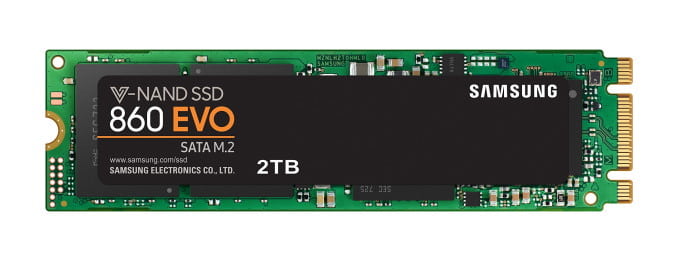
The SSD M.2 format has replaced the usual SSD and has become particularly popular in laptops because of its size. However, its purchase has become a real headache for ordinary users. It should be noted that this difficulty is not in the installation — everything is just simple there (and we will talk about it later). The problem is in the selection and purchase of SSD M.2 of the necessary type. Suffice it to say that there are two types of M.2: SATA and PCIe. And these SSDs are often incompatible with each other.
To make your life a little easier, I have been making up a large compatibility table for laptops and motherboards for several years, which shows in a clear way which SSD is right for you. Find your model, and then see what model you need to buy.
A bit of theory
The M.2 format was conceived as a change of some old interfaces (mSata, mini PCI Express) and even was called NGFF (Next Generation Form Factor) at one time. Its main task is to solve the speed problem. So the previous SATA-3 «rests” on the hardware limit of 6 Gbit/s, and M.2 PCIe can speed up to 32 Gbit/s (5 times faster!). But the devil is in the details.
What’s the problem: M.2 was created as a universal standard. This means that M.2 can also support the old SATA interface, only in the form of a new socket. Do you understand the problem, right? You can have a laptop that has the M.2 socket, however it works under the SATA-3 standard. The purchased SSD M.2 of the PCIe standard doesn’t work in it. Absolutely.
OK, let’s say you have a new M.2 socket that works with PCIe. But even PCIe is divided into several types. Its speed may differ in times depending on how many PCI Express lines are connected to the socket by laptop or motherboard producer. So if you have two lines of PCIe 2.0 format, it is 8 Gbit/s, if 4 PCIe 2.0 — 16 Gbit/s, if 4 PCIe 3.0 — then these are 32 Gbit/s. By the way, AMD Ryzen systems is still more funny — the number of lines depends directly on the processor there. That is, with one processor, you will have a speed of 16 Gbit/s, and with the other — 32 Gbit/s.
An attentive reader will say — but since this is all called M.2 and the standards may be incompatible with each other, then it is probably done somehow so that the SSD of one type can not be connected to the socket of another. The correct answer is: not exactly.
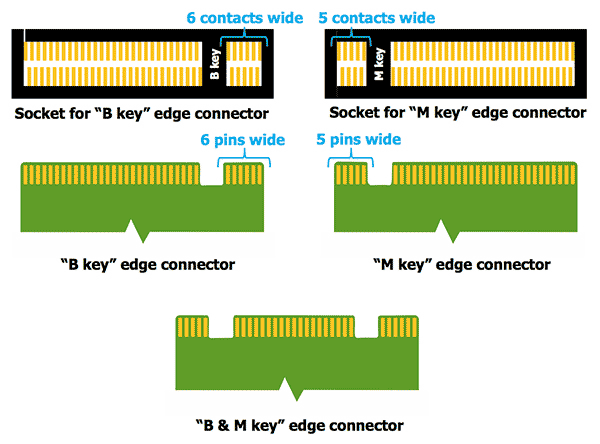
Keys were invented (the type of socket on the board) to solve the problem. As a rule, a computer with an M.2 socket uses the “B key” for PCIe x2. This does not allow to connect a card with PCIe x4 (“M key”).
But the next problem is that SSD of the M.2 format with the SATA interface also has “B key”, so it can be safely connected to the board, but it will not work. Cool, right [sarcasm]?
How difficult is it, and what to do?
As you can see, it is quite easy to get confused in all this variety. Therefore, we decided to make a small cheat sheet (based on open sources), where you can see by the equipment brand which format is suitable for you. The information is updated as knowledge is accumulated. Important: the project is not commercial. You can support it by donate a possible amount to the creators.
As for SSD models, in most cases the optimal choice is:
- For SATA-3 2280: Samsung Evo 860 (minimum 250 Gb)
- For PCIe (NVME) 2280: the classic is Samsung Evo 960 or Evo 970. Important point: some ASUS laptops do not like Samsung SSD. ASUS in general regularly has problems that do not allow to make a loader SSD and put the system on it. Therefore, in the case of ASUS, you should carefully read the forums and choose another model. For example, Kingston KC1000.
Depending on the size, M.2 SATA is divided into three subtypes: 2242, 2260 and 2280 (the most common). The first two numbers are the width, the second two are the length. That is, if you buy SSD with a length of 80 mm, it will not fit into the socket designed for size 2242. Look carefully at the sizes.
If you have a question about a specific device that is not listed, please write in the comments – we will try to fill in the information.
M.2 Compatibility table
Important: the information below is for reference only and is not official! We are not responsible for the fact that the purchased equipment may be incompatible. Please check the information before purchasing it.
| Manufacturer / Series | Model | SATA-3 M.2 | PCIe M.2 | |||
| ACER | 2242 | 2260 | 2280 | 2260 | 2280 | |
| Aspire E15 | E5-575G | • | ||||
| Aspire E5 | E5-774G | • | ||||
| Acer Aspire F15 | F5-573G | • | ||||
| Acer Aspire R13 | • | |||||
| Acer Aspire S13 | E5-575G | • | ||||
| Acer Aspire V3 | V3-372 | • | ||||
| Acer Aspire V15 | VN7-591G, VN7-592G | • | ||||
| Acer Aspire V15 | VN7-593G | • | ||||
| Acer Aspire V17 | VN7-791, VN7-792 | • | ||||
| Acer Aspire V17 | VN7-793 | • | ||||
| Acer Aspire VX 15 | • | |||||
| Acer Aspire А717 | 71G | • | ||||
| Acer Swift 5 | • | |||||
| Acer Swift 7 | S7-371 | • | ||||
| Acer TravelMate | P658 | • | • | |||
| Acer TravelMate | P259 G2 | • | ||||
| Acer TravelMate | X349 | • | • | |||
| Acer Predator Helios 300 | G3-571 | • | ||||
| Acer Predator Helios 300 | PH317 | • | • | |||
| Acer Predator 17 | G5-793 | • | ||||
| Acer Predator 21X | G9-791 | • | ||||
| Acer Predator G9 | G9-592 | • | ||||
| Chromebook | C720 | • | ||||
| Chromebook | C720 Core i3 (C720-3871) | • | ||||
| ASUS | 2242 | 2260 | 2280 | 2260 | 2280 | |
| Chromebox | M004U | • | ||||
| Aspire A517 | 51G-57H9 | • | ||||
| ROG | G750JH | • | ||||
| ROG | G750JX | • | ||||
| ROG | GL552JX | • | ||||
| ROG | GL552VX | • | ||||
| ROG | GL552VW | • | ||||
| ROG | FX502VM | • | ||||
| ROG | GL752VW | • | ||||
| ROG | GL753VE | • | ||||
| N751JK | • | |||||
| X756UA | • | |||||
| FX753VD | • | • | ||||
| Zenbook | NX500JK-DR018H | • | • | |||
| Zenbook | UX301LA | • | ||||
| Zenbook | UX301LAA | • | ||||
| Zenbook Touch | UX31LA | • | ||||
| Vivobook 15 | X542UQ | • | ||||
| Vivobook Pro | N580VD-DM069 | • | ||||
| Vivobook Pro | N580VD-DB74T | • | ||||
| VivoBook Pro | N552VX | • | ||||
| Dell | 2242 | 2260 | 2280 | 2260 | 2280 | |
| Inspiron 15 | i7559-2512BLK | • | ||||
| Inspiron 15 | i7559-5012gry | • | ||||
| Inspiron 15 | 7567 | • | ||||
| Inspiron 17 | 7773 | • | ||||
| Venue 11 Pro | 7000 | • | ||||
| Venue 11 Pro | 7130 | • | ||||
| Venue 11 Pro | 7139 | • | ||||
| Vostro 15 | 5568 | • | ||||
| XPS | 13 (9343) | • | ||||
| GIGABYTE | 2242 | 2260 | 2280 | 2260 | 2280 | |
| AORUS | X7 | • | ||||
| HP | 2242 | 2260 | 2280 | 2260 | 2280 | |
| Chromebook | 14 | • | ||||
| EliteBook | 820 G1 | • | ||||
| EliteBook | 840 G1 | • | ||||
| EliteBook | 850 G1 | • | ||||
| EliteBook | 850 G2 | • | ||||
| EliteBook Revolve | 810 G2 | • | ||||
| Folio | 1040 G1 | • | ||||
| Omen 15 | • | • | ||||
| Omen 17 | 17-w109ur | • | • | |||
| Pavilion 15 | t-an000 Star Wars Special Edition | • | ||||
| ProBook | 430 G1 | • | ||||
| ProBook | 430 G2 | • | ||||
| ProBook | 430 G3 | • | ||||
| ProBook | 430 G4 | • | ||||
| ProBook | 440 G3 | • | ||||
| ProBook | 440 G4 | • | ||||
| ProBook | 450 G2 | • | ||||
| ProBook | 450 G3 | • | • | |||
| ProBook | 450 G4 | • | ||||
| ProBook | 470 G1 | • | ||||
| ProBook | 470 G3 | • | ||||
| ProBook | 470 G4 | • | ||||
| ProBook | 640 G1 | • | ||||
| ProBook | 650 G1 | • | ||||
| Spectre | CTO 13t-3000 | • | ||||
| Spectre | X360 | • | ||||
| ZBook | 14 | • | ||||
| ZBook | 15u G2 | • | ||||
| Lenovo | 2242 | 2260 | 2280 | 2260 | 2280 | |
| Legion | Y520 | • | ||||
| Legion | Y720 | • | ||||
| G Series | G410 | • | ||||
| G Series | G510 | • | ||||
| G Series | G710 | • | ||||
| V Series | V4400u | • | ||||
| B Series | B5400 | • | ||||
| M Series | M5400 | • | ||||
| Flex | 14 | • | ||||
| Flex | 14D | • | ||||
| Flex | 15 | • | ||||
| Flex | 15D | • | ||||
| IdeaPad | L440 | • | ||||
| IdeaPad | L540 | • | ||||
| IdeaPad | U330 | • | ||||
| IdeaPad | U430 | • | ||||
| IdeaPad | U530 | • | ||||
| IdeaPad | U530p | • | ||||
| IdeaPad | Y410p | • | ||||
| IdeaPad | Y510p* | • | ||||
| IdeaPad | Y700 | • | ||||
| LaVie | Z | • | ||||
| LaVie | Z 360 | • | ||||
| ThinkPad | S431 | • | ||||
| ThinkPad | S440 | • | ||||
| ThinkPad | S531 | • | ||||
| ThinkPad | S540 | • | ||||
| ThinkPad | T431s | • | ||||
| ThinkPad | T440 | • | ||||
| ThinkPad | T440p | • | ||||
| ThinkPad | T440s | • | ||||
| ThinkPad | T450 | • | ||||
| ThinkPad | T450s | • | ||||
| ThinkPad | T540 | • | ||||
| ThinkPad | T540p | • | ||||
| ThinkPad | T550 | • | ||||
| ThinkPad | W540 | • | ||||
| ThinkPad | X240 | • | ||||
| ThinkPad | X240 | • | ||||
| ThinkPad | X240s | • | ||||
| ThinkPad | X250 | • | ||||
| ThinkPad Edge | E431 | • | ||||
| ThinkPad Edge | E440 | • | ||||
| ThinkPad Edge | E531 | • | ||||
| ThinkPad Edge | E540 | • | ||||
| ThinkPad Yoga | 12 | • | ||||
| ThinkPad Yoga | 14 | • | ||||
| ThinkPad Yoga 2 | 13 | • | ||||
| Razer | 2242 | 2260 | 2280 | 2260 | 2280 | |
| Blade | 14 (2014) | • | ||||
| Blade | 14 (2015) | • | ||||
| Samsung | 2242 | 2260 | 2280 | 2260 | 2280 | |
| ATIV | Book 9 Plus | • | ||||
| Sony | 2242 | 2260 | 2280 | 2260 | 2280 | |
| VAIO | Duo 13 | • | • | |||
| VAIO | Pro 13 Series** | • | • | |||
| VAIO | Pro 13 (bootable) | • | ||||
Примечания:
* Model IdeaPad Y510p exists in a modification with or without M.2.
** There are VAIO Pro 13 models with both SATA and PCIe on board. You must carefully read the instructions, or see what kind of SSD model is already installed in the laptop
| Manufacturer / Series | Model | SATA-3 M.2 | PCIe M.2 | |||
| MSI | 2242 | 2260 | 2280 | 2260 | 2280 | |
| GT80S 6QF | •
|
•
|
||||
| GT80S 6QE | ||||||
| GT80S 6QD | ||||||
| GT72S 6QF | ||||||
| GT72S 6QE | ||||||
| GT72S 6QD | ||||||
| GT72 6QE | ||||||
| GT72 6QD | ||||||
| GS72 6QE | ||||||
| GS72 6QD | ||||||
| GS72 6QC | ||||||
| GS70 6QE | ||||||
| GS60 6QE | ||||||
| GS70 6QD | ||||||
| GS60 6QD | ||||||
| GS70 6QC | ||||||
| GS60 6QC | ||||||
| GS40 6QE | ||||||
| GE72 6QE | ||||||
| GE62 6QE | ||||||
| GE72 6QD | ||||||
| GE62 6QD | ||||||
| GE62 6QC | ||||||
| GE72 6QC | ||||||
| GE72 6QL | ||||||
| GE62 6QL | ||||||
| GE72 6QF | ||||||
| GE62 6QF | ||||||
| GP72 6QF | ||||||
| GP62 6QF | ||||||
| GP72 6QE | ||||||
| GP62 6QE | ||||||
| GL72 6QF | ||||||
| GL62 6QF | ||||||
| GL72 6QE | ||||||
| GL62 6QE | ||||||
| GL72 6QD | ||||||
| GL62 6QD | ||||||
| GL72 6QC | ||||||
| GL62 6QC | ||||||
| GT80 2QE | • | |||||
| GT80 2QD | • | |||||
| GT80 2QC | • | |||||
| GT72 2QE | • | |||||
| GT72 2QD | • | |||||
| GS60 2QE | • | |||||
| GS60 2QD | • | |||||
| GS60 2QC | • | |||||
| GE72 2QF | • | |||||
| GE62 2QF | • | |||||
| GE72 2QE | • | |||||
| GE62 2QE | • | |||||
| GE72 2QD | • | |||||
| GE62 2QD | • | |||||
| GE72 2QC | • | |||||
| GE62 2QC | • | |||||
| GE72 2QL | • | |||||
| GE62 2QL | • | |||||
| GP72 2QE | • | |||||
| GP62 2QE | • | |||||
| GP72 2QD | • | |||||
| GP62 2QD | • | |||||
| GT72 2PE | • | |||||
| GT72 2PC | • | |||||
| GS60 2PE | • | |||||
| GS60 2PC | • | |||||
| GS60 2PL | • | |||||
| GS60 2PM | • | |||||
| GS30 2M | • | |||||
| Vortex G65 6QF | • | • | ||||
| Vortex G65 6QD | • | • | ||||
| PX60 6QE | • | • | ||||
| PX60 6QD | • | • | ||||
| PE70 6QE | • | • | ||||
| PE60 6QE | • | • | ||||
| PE60 6QD | • | • | ||||
| PE70 6QD | • | • | ||||
MiniPC, HTPC and Motherboards
| Manufacturer / Series | Model | SATA-3 M.2 | PCIe M.2 | |||
| Dell | 2242 | 2260 | 2280 | 2260 | 2280 | |
| Inspiron | Micro 3050 | • | ||||
| HP | 2242 | 2260 | 2280 | 2260 | 2280 | |
| EliteBook | 820 G2 | • | ||||
| Pavilion Mini | 300-020 | • | ||||
| Stream Mini | 200-010 | • | ||||
| Intel | 2242 | 2260 | 2280 | 2260 | 2280 | |
| NUC kit | NUC5i3MYHE | • | • | |||
| NUC kit | NUC5i3RYH | • | • | • | ||
| NUC kit | NUC5i3RYK | • | • | • | ||
| NUC kit | NUC5i5MYHE | • | • | |||
| NUC kit | NUC5i5RYH | • | • | • | ||
| NUC kit | NUC5i5RYK | • | • | • | ||
| NUC Board | NUC5i3MYBE | • | • | |||
| NUC Board | NUC5i5MYBE | • | • | |||
| MSI | 2242 | 2260 | 2280 | 2260 | 2280 | |
| Cubi | 2 Plus | • | ||||
| Cubi | 2 Plus vPro | • | ||||
| Manufacturer / Сhipset | Model | M.2 Type | M.2 size | ||
| ASRock | 2242 | 2260 | 2280 | ||
| AM2+ | A88M-G/3.1 | PCIe Gen2 x4 | • | • | • |
| AM3+ | AMD Fatal1ty 990FX | SATA3 | • | ||
| Intel H97 | Fatal1ty H97 Killer | PCIe Gen2 x2 & SATA3 | • | • | |
| Intel X99 | Fatal1ty X99M Killer | PCIe Gen3 x4 & SATA3 | • | • | |
| Intel X99 | X99 Extreme3 | PCIe Gen3 x4 & SATA3 | • | • | • |
| Intel X99 | X99 Extreme4 | PCIe Gen3 x4 & SATA3 | • | • | |
| Intel X99 | X99 Extreme6 | PCIe Gen3 x4 & SATA3 | • | • | • |
| Intel X99 | X99 Extreme11 | SATA3 | • | ||
| Intel X99 | X99M Extreme4 | PCIe Gen3 x4 & SATA3 | • | • | • |
| Intel X99 | X99 OC Formula | PCIe Gen2 x4 & SATA3 | • | • | |
| Intel X99 | X99 WS | PCIe Gen3 x4 & SATA3 | • | • | |
| Intel X99 | X99 WS-E/10G | PCIe Gen2 x4 & SATA3 | • | • | |
| Intel X99 | X99E-ITX/ac | PCIe Gen3 x4 & SATA3 | • | • | |
| Intel Z97 | Fatal1ty Z97 Killer | PCIe Gen2 x2 & SATA3 | • | • | |
| Intel Z97 | Fatal1ty Z97 Professional | PCIe Gen2 x2 & SATA3 | • | • | • |
| Intel Z97 | Fatal1ty Z97 Killer | PCIe Gen2 x2 & SATA | • | • | • |
| Intel Z97 | Fatal1ty Z97 Killer/3.1 | PCIe Gen2 x2 & SATA | • | • | • |
| Intel Z97 | Fatal1ty Z97 Killer/3.1 | PCIe Gen2 x2 & SATA | • | • | • |
| Intel Z97 | Fatal1ty Z97M Killer | PCIeGen2 x2 & SATA3 | • | • | • |
| Intel Z97 | Fatal1ty Z97X Killer/3.1 | PCIe Gen2 x2 & SATA3 | • | • | • |
| Intel Z97 | Z97 Extreme4 | PCIe Gen2 x2 & SATA3 | • | • | |
| Intel Z97 | Z97 Extreme4 | PCIe Gen2 x2 & SATA3 | • | • | • |
| Intel Z97 | Z97 Extreme6 | PCIe Gen2 x2 & SATA3 | • | • | • |
| Intel Z97 | Z97 Extreme6/ac | PCIe Gen2 x2 & SATA3 | • | • | • |
| Intel Z97 | Z97 Extreme6/3.1 | PCIe Gen2 x2 & SATA3 | • | • | • |
| Intel Z97 | Z97 Extreme9 | PCIe Gen2 x2 & SATA3 | • | • | |
| Intel Z97 | Z97 OC Formula | PCIe Gen2 x2 & SATA3 | • | • | |
| Intel Z97 | Z97M OC Formula | PCIe Gen2 x2 & SATA | • | • | • |
| Intel Z97 | Z97 Pro4 | PCIe Gen2 x2 & SATA3 | • | • | • |
| Intel Z97 | Z97E-ITX/ac | PCIe Gen2 x2 & SATA3 | • | ||
| Intel Z97 | Z97M OC Formula | PCIe Gen2 x2 & SATA3 | • | • | |
| Z270 | TAICHI | PCIe Gen3 x4 & SATA3 | • | ||
| ASUS | 2242 | 2260 | 2280 | ||
| Intel H97 | H97I-PLUS | SATA и PCIE | • | • | |
| Intel Z97 | Z97M-PLUS | PCIe Gen2 x2 & SATA3 | • | • | |
| Intel H97 | H97-PLUS | PCIe Gen2 x2 & SATA3 | • | • | |
| Intel H97 | H97M-PLUS | SATA & PCIE | • | • | |
| Intel H97 | H97M-E/CSM | PCIe Gen2 x2 & SATA3 | • | • | |
| Intel H97 | MAXIMUS VI EXTREME | PCIe Gen2 x1 & SATA3 | • | • | • |
| Intel H97 | MAXIMUS VI FORMULA | PCIe Gen2 x1 & SATA3 | • | • | • |
| Intel H97 | MAXIMUS VI GENE | PCIe Gen2 x1 & SATA3 | • | • | • |
| Intel H97 | MAXIMUS VI IMPACT | PCIe Gen2 x1 & SATA3 | • | • | • |
| Intel HM175 | Sata3 | • | |||
| Intel X99 | RAMPAGE V EXTREME | PCIe Gen3 x4 & SATA3 | • | ||
| Intel Z97 | MAXIMUS VII FORMULA | PCIe Gen2 x2 & SATA3 | • | ||
| Intel Z97 | MAXIMUS VII FORMULA/WATCH DOGS | PCIe Gen2 x2 & SATA3 | • | ||
| Intel Z97 | MAXIMUS VII GENE | PCIe Gen2 x4 | • | • | |
| Intel Z97 | MAXIMUS VII HERO | PCIe Gen2 x2 & SATA3 | • | • | |
| Intel Z97 | MAXIMUS VII IMPACT | PCIe Gen2 x2 & SATA3 | • | • | |
| Intel Z97 | Z97-A | PCIe Gen2 x2 & SATA3 | • | • | |
| Intel Z97 | Z97-C | PCIe Gen2 x2 & SATA3 | • | • | |
| Intel Z97 | Z97-DELUXE (NFC & WLC) | PCIe & SATA3 | • | • | |
| Intel Z97 | Z97-DELUXE/USB 3.1 | PCIe & SATA3 | • | • | |
| Intel Z97 | Z97-E | PCIe Gen2 x2 & SATA3 | • | • | • |
| Intel Z97 | Z97I-PLUS | SATA & PCIE | • | • | |
| Intel Z97 | Z97-K/CSM | PCIe Gen2 x2 & SATA3 | • | • | |
| Intel Z97 | Z97-P | PCIe Gen2 x2 & SATA3 | • | • | |
| Intel Z97 | Z97-PRO | PCIe Gen2 x2 & SATA3 | • | • | |
| Intel Z97 | Z97-PRO(Wi-Fi ac) | PCIe Gen2 x2 & SATA3 | • | • | |
| Intel Z97 | Z97M-PLUS | PCIe Gen2 x2 & SATA3 | • | • | |
| Intel Z97 | Z97-WS | PCIe Gen2 x2 & SATA3 | • | • | |
| Intel Z97 | Z97I-PLUS | PCIe Gen2 x2 & SATA3 | • | • | |
| B250 | Prime B250 Pro | Два M.2: PCIe/Sata и только PCIe | • | • | • |
| X299 | PRIME X299-A | Два M.2: PCIe/Sata и только PCIe | • | • | • |
| x370 | Prime x370 Pro | Зависит от процессора. C младшими только SATA3, с Ryzen появляется поддержка PCIe | • | • | • |
| X370 | ROG Strix z370-E Gaming | Два M.2: PCIe/Sata и только PCIe | • | • | • |
| GIGABYTE | 2242 | 2260 | 2280 | ||
| GA-970-Gaming (rev. 1.0) | PCIe x4/x2/x1 & SATA3 | • | • | • | |
| GA-990FX-Gaming (rev. 1.0) | PCIe x2/x1 & SATA3 | • | • | • | |
| GA-H97-D3H | PCIe Gen2 x2 & SATA3 | • | • | • | |
| GA-H97-Gaming 3 | PCIe Gen2 x2 & SATA3 | • | • | • | |
| GA-H97M-D3HP | PCIe Gen2 x2 & SATA3 | • | • | • | |
| GA-X99-Gaming G1 WIFI | SATA3 | • | |||
| GA-X99-Gaming 5 | PCIe Gen2 x2 & SATA3 | • | • | • | |
| GA-X99-Gaming 5P (rev. 1.0) | PCIe Gen2 x2 & SATA3 | • | • | • | |
| GA-X99M-Gaming 5 | PCIe Gen2 x2 & SATA3 | • | • | • | |
| GA-X99-GAMING 7 | SATA3 | • | • | ||
| GA-X99-SOC Champion (rev. 1.0) | PCIe Gen2 x2 & SATA3 | • | • | • | |
| GA-X99-UD3 | PCIe Gen2 x2 & SATA3 | • | • | • | |
| GA-X99-UD3P (rev. 1.0) | PCIe Gen2 x2 & SATA3 | • | • | • | |
| GA-X99-UD4 (rev. 1.0) | PCIe Gen2 x2 & SATA3 | • | • | • | |
| GA-X99-UD4 (rev. 1.1) | PCIe Gen2 x2 & SATA3 | • | • | • | |
| GA-X99-UD4P (rev. 1.0) | PCIe Gen2 x2 & SATA3 | • | • | • | |
| GA-X99-UD5 WIFI | PCIe Gen2 x2 & SATA3 | • | • | • | |
| GA-X99-UD7 WIFI | PCIe Gen2 x2 & SATA3 | • | • | • | |
| GA-Z97-D3H(rev. 1.0) | PCIe Gen2 x2 & SATA3 | • | • | • | |
| GA-Z97-D3H(rev. 1.1) | PCIe Gen2 x2 & SATA3 | • | • | • | |
| GA-Z97X-Gaming 3 | SATA3 | • | |||
| GA-Z97MX-Gaming 5 | PCIe Gen2 x2 & SATA3 | • | • | • | |
| GA-Z97X-Gaming 5 | PCIe Gen2 x2 & SATA3 | • | • | • | |
| GA-Z97X-Gaming 7 | PCIe Gen2 x2 & SATA3 | • | • | • | |
| GA-Z97X-SLI | PCIe Gen2 x2 & SATA3 | • | • | • | |
| GA-Z97X-UD3H | PCIe Gen2 x2 & SATA3 | • | • | • | |
| GA-Z97X-UD3H-BK (rev. 1.0) | PCIe Gen2 x2 & SATA3 | • | • | • | |
| GA-Z97X-UD3H-BK (rev. 1.1) | PCIe Gen2 x2 & SATA3 | • | • | • | |
| GA-Z97X-UD5H | PCIe Gen2 x2 & SATA3 | • | • | • | |
| GA-Z97X-UD5H-BK (rev. 1.0) | PCIe Gen2 x2 & SATA3 | • | • | • | |
| GA-Z97X-UD5H-BK (rev. 1.1) | PCIe Gen2 x2 & SATA3 | • | • | • | |
| MSI | 2242 | 2260 | 2280 | ||
| H97 GAMING3 | PCIe Gen2 x2 & SATA3 | • | • | • | |
| H97 GUARD-PRO | PCIe Gen2 x2 & SATA3 | • | • | • | |
| H97M-G43 | PCIe Gen2 x2 & SATA3 | • | • | • | |
| X99A GODLIKE GAMING | PCIe Gen3 x4 & SATA3 | • | • | • | |
| X99A MPOWER AC | PCIe & SATA3 | • | • | • | |
| X99A RAIDER | SATA3 | • | |||
| X99A XPOWER AC | PCIe & SATA3 | • | • | • | |
| X99S MPOWER | PCIe Gen3 x4 & SATA3 | • | • | • | |
| X99S XPOWER AC | PCIe Gen3 x4 & SATA3 | • | • | • | |
| Intel Z97 | Z97 GAMING 3 | SATA3 | • | ||
| Intel Z97 | Z97 GAMING 5 | PCIe Gen2 x2 & SATA3 | • | • | • |
| Intel Z97 | Z97 GAMING 7 | PCIe Gen2 x2 & SATA3 | • | • | • |
| Intel Z97 | Z97 GAMING 9 AC | PCIe Gen2 x2 & SATA3 | • | • | • |
| Intel Z97 | Z97 GAMING 9 ACK | PCIe Gen2 x2 & SATA3 | • | • | • |
| Intel Z97 | Z97 GUARD-PRO | PCIe Gen2 x2 & SATA3 | • | ||
| Intel Z97 | Z97 MPOWER | PCIe Gen2 x2 & SATA3 | • | • | • |
| Intel Z97 | Z97 MPOWER MAX AC | PCIe Gen2 x2 & SATA3 | • | • | • |
| Intel Z97 | Z97 U3 PLUS | PCIe Gen2 x2 & SATA3 | • | • | • |
| Intel Z97 | Z97 XPOWER AC | PCIe Gen2 x2 & SATA3 | • | • | • |
| Intel Z97 | Z97-G55 SLI | PCIe Gen2 x2 & SATA3 | • | • | • |
| Intel Z97 | Z97M-G43 | PCIe Gen2 x2 & SATA3 | • | • | • |
| Intel Z97 | Z97M GAMING | PCIe Gen2 x2 & SATA3 | • | • | • |
| Z97S GUARD-PRO | PCIe Gen2 x2 & SATA3 | • | • | • | |
| Z97S SLI PLUS | PCIe Gen2 x2 & SATA3 | • | • | • | |
| Z97S SLI Krait Edition | PCIe Gen2 x2 & SATA3 | • | |||
| X99S GAMING 7 | SATA3 | • | |||
| X99S GAMING 9 AC | SATA3 | • | |||
| H270 | H270 Gaming Pro Carbon | Bouth: Gen3 x4 & SATA3 | • | ||
| 970A | 970A Gaming Pro Carbon | PCIe Gen2 x2 & SATA3 | • | ||
| B350 | B350 TOMAHAWK | PCIe x4 | • | ||
How do I install an SSD in my PC
In most cases, this is easy. The algorithm is as follows:
- Open YouTube
- Enter the «laptop / motherboard model» + M.2 installation
- Repeat seen on video 🙂
How do I transfer Windows to new SSD for free
Аfter you’ve installed the M.2 SSD is making sure that your computer recognizes it as a new storage device. Some motherboards will do it , but when that doesn’t happen, you’ll need to manually tell BIOS that an M.2 device is connected.
The final step is clone yor operating system to a new SSD. There are a huge number of paid software products that allow to clone the system partition of a hard disk on a new SSD M.2. Many of them cost around $50 and do not always solve well their task.
We prefer the time-tested partly free product Aomei Partition Assistant from Chinese developers. In versions before 7.5.1, the SSD cloning function was available in the free version, but starting from version 8.xx, it has become available only in the paid package.
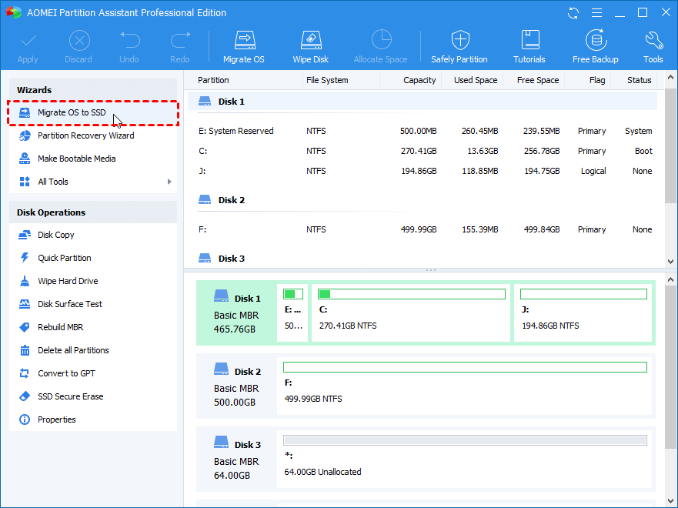
This would be a problem if developers did not periodically present keys for any one version of their system. Now you can download version 8.7 and use the key: AOPR-K7X4P-Z126E-XZZUX Great offer for a one-time operation!
The migration process is described in detail on this page.
Отправить ответ